Skip to content
−60%Launch offer: −60% for your first 12 months on monthly billing

Say your week. We'll post it.

Sayweek writes your weekly LinkedIn, Instagram, Facebook, TikTok and YouTube posts from what actually happened – your calendar, your notes, a voice memo, your CRM and the news. In your own voice. You just approve.

Request accessWatch the 1-minute demo
  • No card required
  • Cancel anytime
  • EU data storage, GDPR

The AI content planner for consultants, coaches and agencies

Publishes to

  • LinkedIn – personal profileLinkedIn
  • InstagramInstagram
  • Facebook PageFacebook
  • TikTokTikTok
  • YouTubeYouTube
  • LinkedIn – company pageLinkedIn Page
  • Google Business ProfileGoogle Business
  • Threads@Threads
  • Bluesky🦋Bluesky
  • X𝕏X
  • Telegram✈Telegram

Try it now

What would we write for you? Enter your website.

We read your homepage and suggest 3 post openers – no sign-up, nothing stored.

See it in 1 minute

How your week becomes an approved post – with captions.

How it works

Three steps, 15 minutes a week

No blank page and no prompt writing. Sayweek works from what you already have.

  1. 1

    Say your week

    Connect your calendar (Google, Outlook, iCloud), drop a thought or a voice memo, and Sayweek brings topics from the news and – if you switch it on – your CRM.

  2. 2

    We write it in your voice

    It learns from your old posts, your edits and your best-performing posts. Every post starts from your own thought – that's what keeps it human.

  3. 3

    You approve, we post

    Review, tweak and approve in one tap – from a phone notification, or your client does it via a link. It goes out at the best time.

The product

A teammate who writes your posts every week

Real screens from the Sayweek app – this is your week when you no longer have to write it yourself.

Ideas

Ideas from your real week

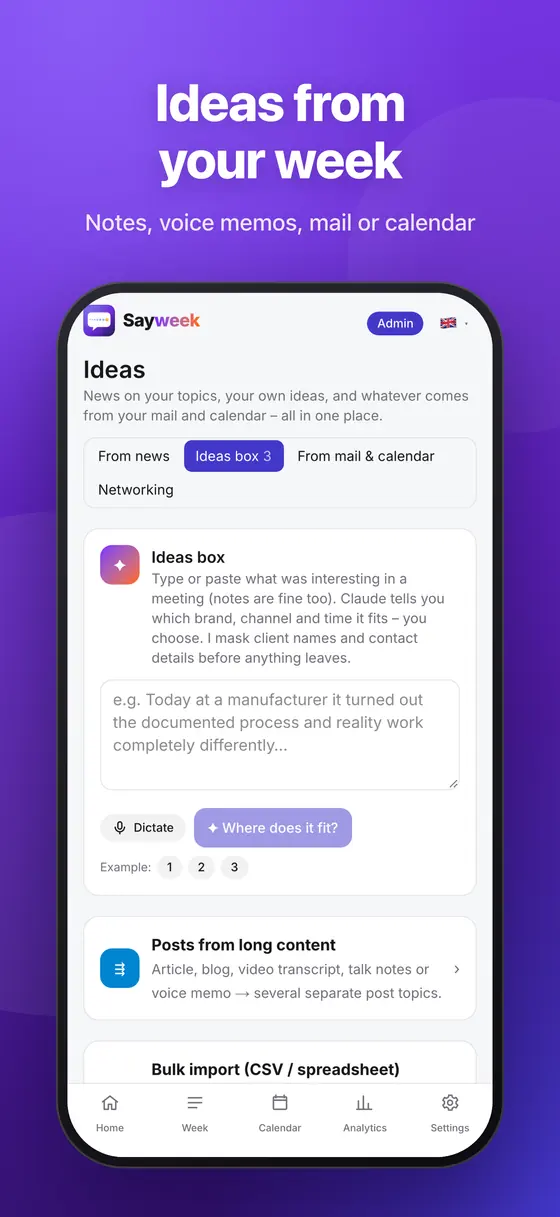
Sayweek collects what happened this week and tells you which brand, channel and time slot each idea fits.

  • Calendar events (Google, Outlook, iCloud), notes and dictated voice memos
  • News radar on your topics, from curated industry sources
  • CRM (HubSpot, Pipedrive) and e-mail – only if you switch them on; client names are masked
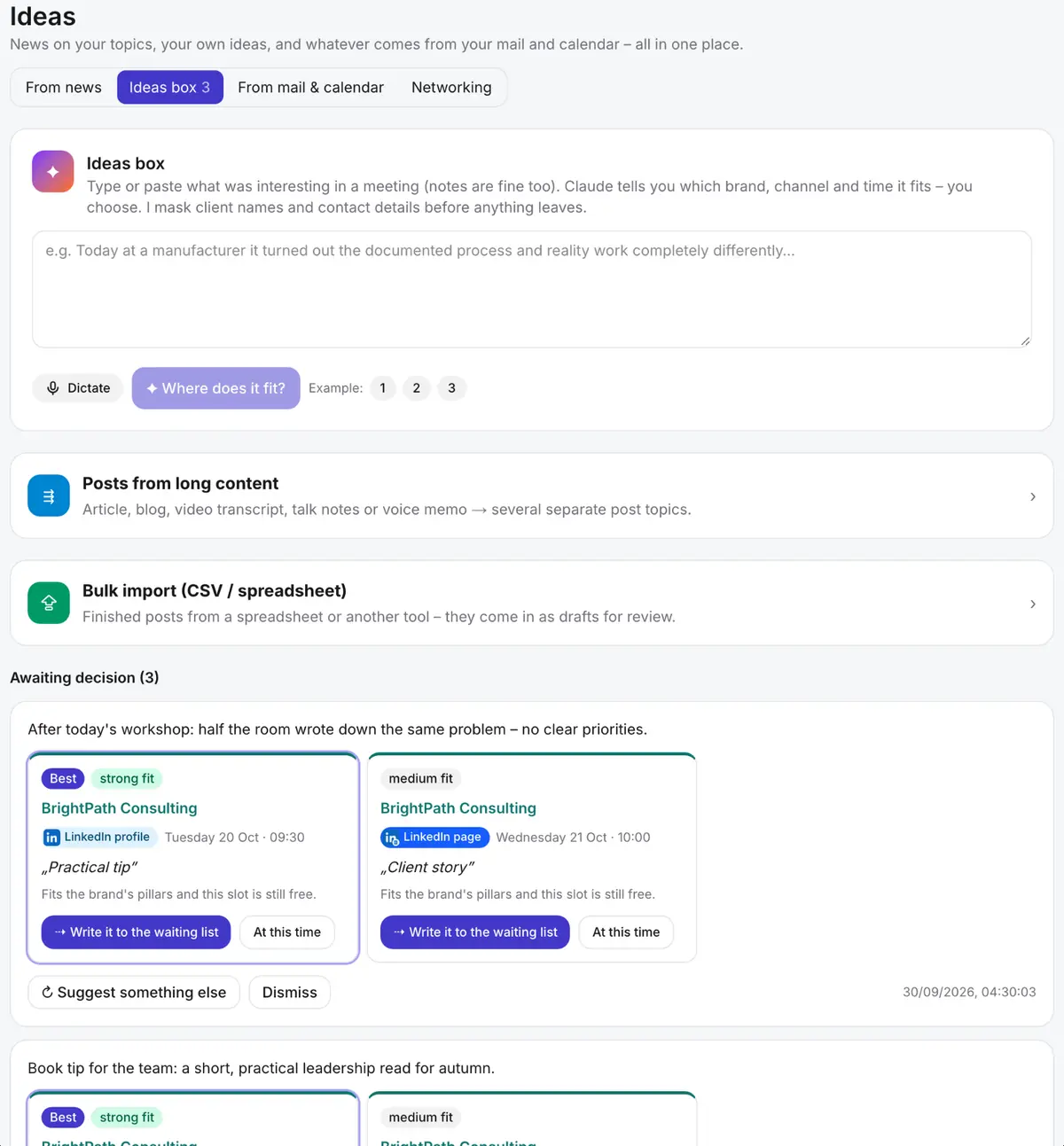
The Sayweek Ideas page: ideas box with dictation, posts from long content, and the suggested brand, channel and time

Writing

Writes like you – not like a robot

It learns from your old posts, every edit you make and your best-performing posts. You decide what stays.

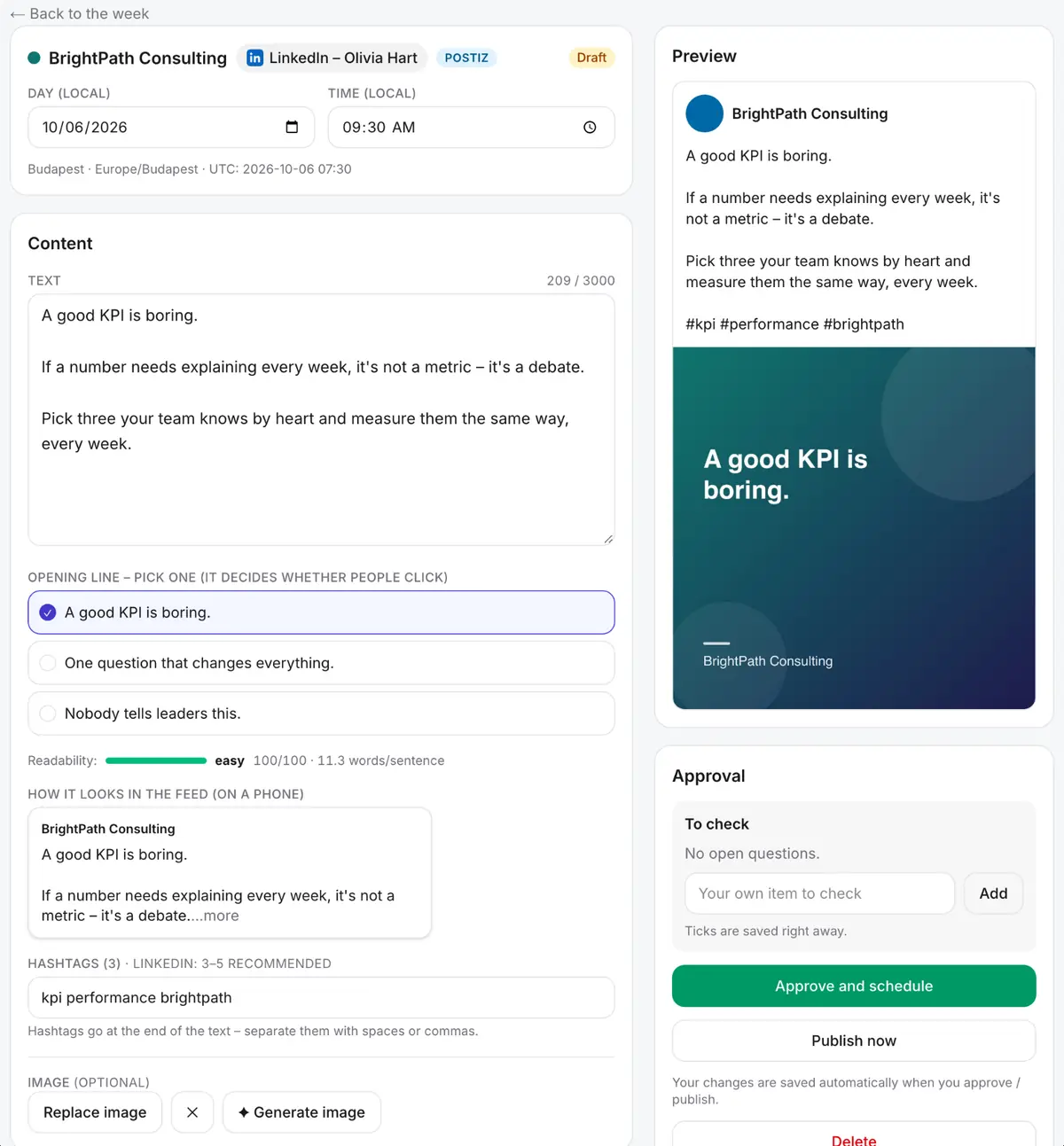
  • Pick one of three opening lines
  • Readability check and a preview of how it looks in the feed
  • Image, generated image or a PDF carousel in your brand colours
The Sayweek post editor: text, opening-line options, readability, preview and approval

Approval

Approval your clients will actually use

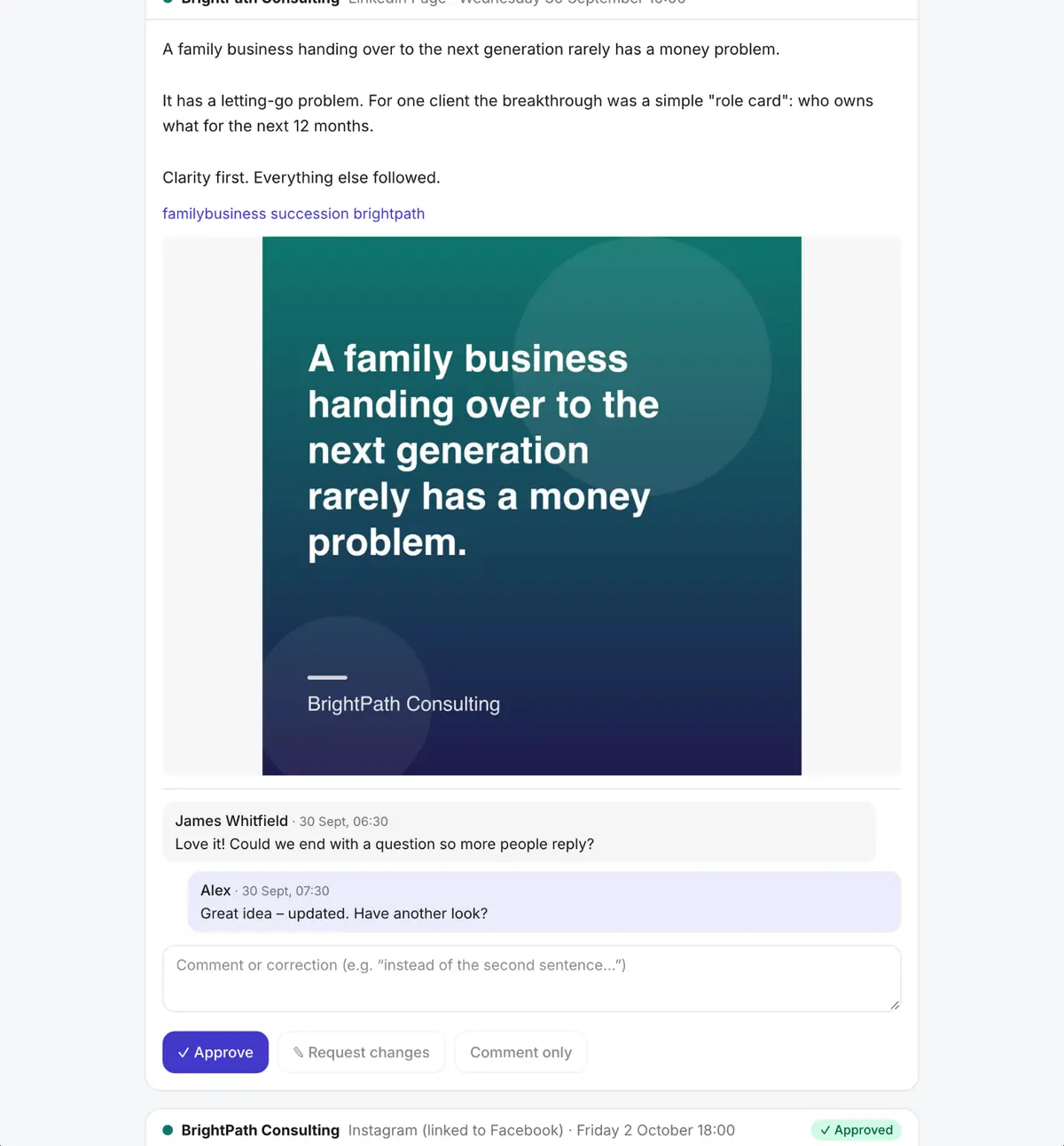
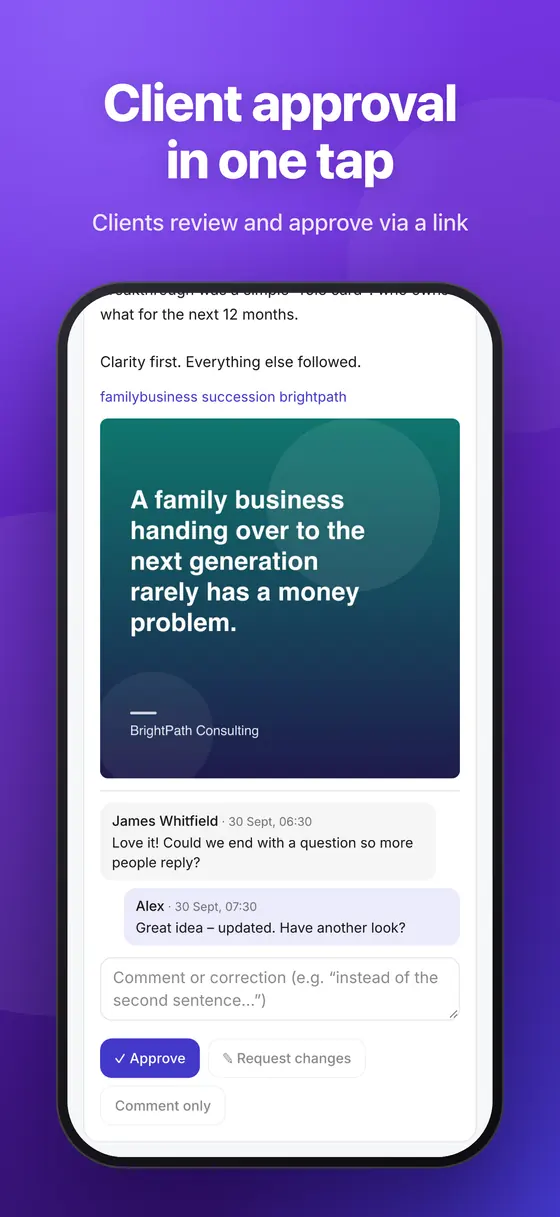
A login-free link for your client: they read, comment or approve. You see everything in one place.

  • Approve, request changes or comment in one click
  • Two-step approval and versions for teams
  • Nothing goes out without approval – and there's an emergency brake
The Sayweek review page: a post with its image, a client comment, a reply, and Approve and Request changes buttons

Planning

Your week, planned ahead

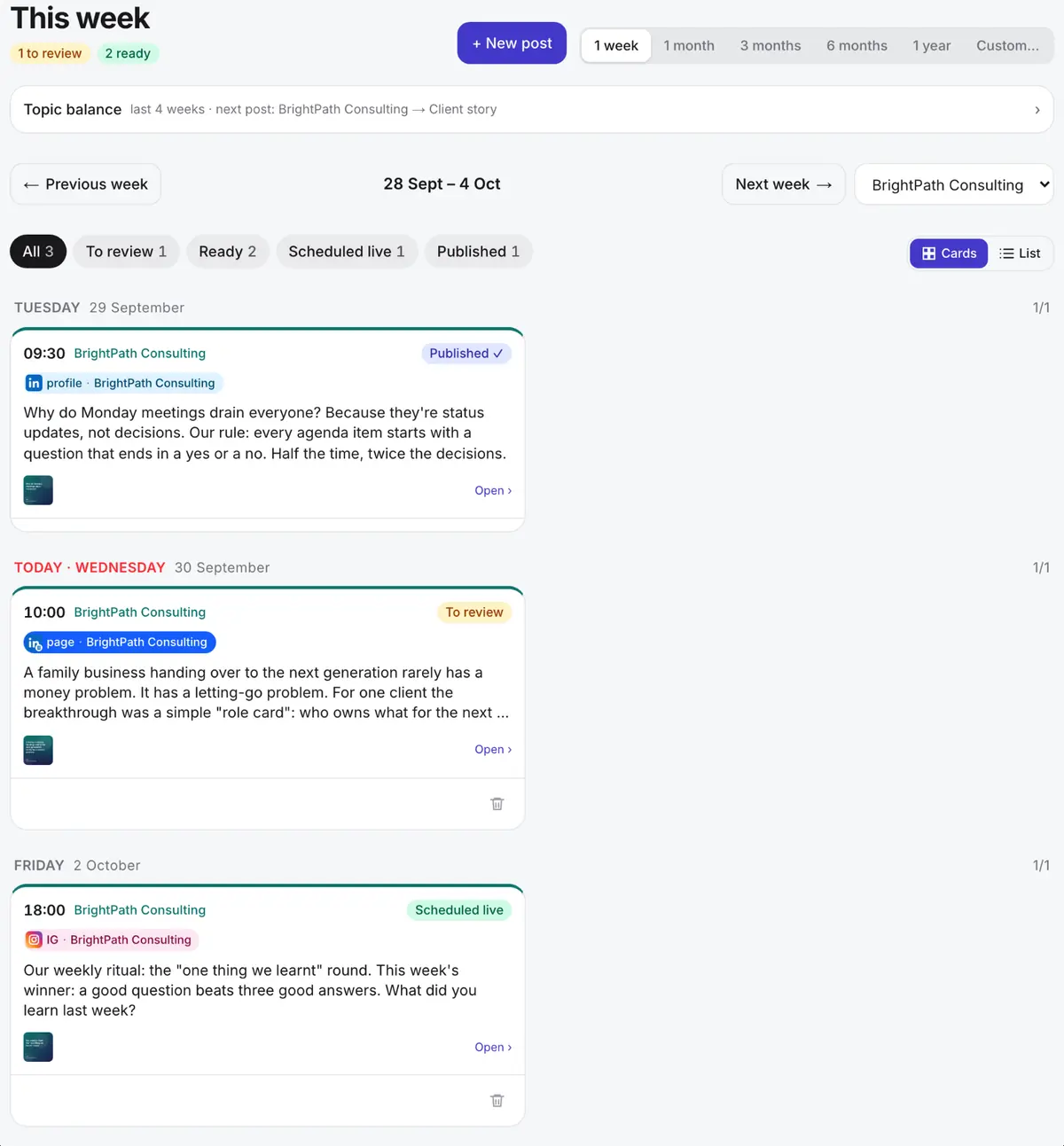
See where a post is missing and let Sayweek fill it from the waiting list – at the best time in your audience's time zone.

  • Weekly plan and calendar across every channel
  • Rhythm and rules per brand
  • Never posts on holidays or travel days by mistake
The Sayweek weekly plan: days, channels and the status of each post

Results

See what works – and do more of it

Stats by topic pillar and opening style. Your best posts become the examples for the next ones.

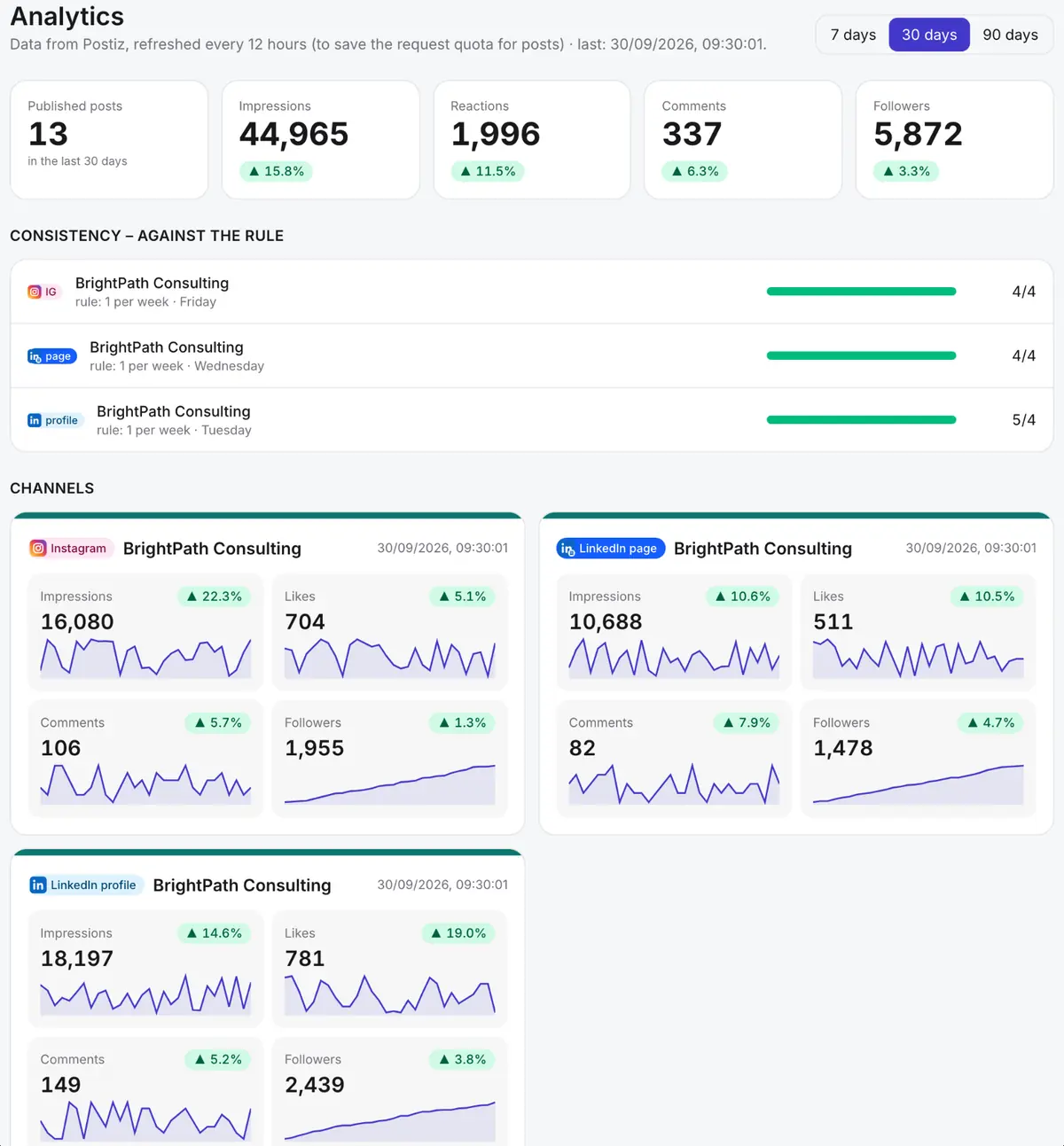
  • Impressions, reactions, comments and followers per channel – and whether you keep your rhythm
  • Visits per post via UTM links (Google Analytics 4)
  • Monthly PDF report by e-mail – white-label for agencies
The Sayweek analytics page: performance by channel and topic pillar

Screenshots with fictional demo data.

And everything else you need to post every week

In one place – no extra tools, no copy and paste.

  • Direct publishing

    LinkedIn (profile and company page), Instagram, Facebook and Bluesky directly; X, Threads and more via your own Postiz account.

  • Comment inbox

    Comments under your posts in one place, with reply ideas – answer without switching apps.

  • Monthly PDF reports

    An automatic monthly summary by e-mail, for you or your client.

  • White-label for agencies

    Your name, logo and colour on the client review page and reports – even on your own domain.

  • PDF carousels

    Turn a post into a swipeable LinkedIn document in your brand colours – one click.

  • Long content to posts

    Blog, article, video transcript or talk notes → several posts from different angles.

  • Teams and ghostwriters

    Roles, two-step approval, versions and employee advocacy in each colleague's own voice.

  • English, German, Hungarian

    Post language per brand; the app, notifications and reports come in all three languages too.

  • Emergency brake

    Pause every scheduled post with one tap – for example after unexpected news.

  • Weekly interview

    Five minutes about your week, by voice or text – and your plan and first drafts are ready.

  • Team voice

    One company update becomes a draft in each colleague's own voice – they just approve it.

  • Brand graphics

    Logo, colours and font once – the templates fill themselves from the post text.

  • Ideas from your meetings

    Fireflies, Fathom, tl;dv, a forwarded recap e-mail or a pasted transcript – post ideas from it; transcripts are never stored.

  • Ideas via Telegram

    Send the Telegram bot a voice message or a few lines – the idea is waiting in Sayweek.

  • Your first week in 60 seconds

    Enter your website and Sayweek prepares your first weekly plan, drafts included.

  • Claude and ChatGPT

    Connect your AI assistant and let it plan next week's posts – they wait for your approval.

  • AI transparency (EU AI Act)

    AI labels on posts, logged approvals and a downloadable compliance report.

  • Desktop app

    Install it from your browser: its own window and icon on your computer.

  • Mention watcher

    When news, blogs or comments under your posts mention your company or name, we let you know – with sentiment, importance and a reply idea in your voice. You decide whether to reply.

  • Browser extension

    For Chrome and Edge: turn any article or page into an idea with one click.

  • iPhone and Android apps

    Approve a post with one tap from the notification, sign in with Face ID or your fingerprint, see your week on a widget, and send an idea or a quick post from any app's share sheet. Get it on the App Store and Google Play.

  • Teleprompter for your videos

    Your post becomes a 30–60-second script; read it off the teleprompter, the camera records, and the video goes straight to the studio.

  • Alt text for every image

    AI looks at the image, writes the description in the post's language, and we send it with the image wherever the network takes it.

  • Blog article from a post

    A post becomes a search-friendly article for your own site – after approval it goes to WordPress, Webflow or Ghost, or you download it.

  • Crisis brake

    When something tragic or extraordinary happens in your country, we tell you – and one click pauses your upbeat and promotional posts for 24–72 hours.

  • Critical comment alerts

    A complaint or an angry comment under your post? We tell you right away – respecting your quiet hours – with a calm reply suggestion in your voice.

  • Second chance

    When a post starts weakly, we suggest a fresh variant for another channel or time – with the reason, for your approval.

  • Trending topics & hashtags

    What's starting to trend in your field's news, and which hashtags fit your post – within each network's rules.

  • Shareable content calendar

    Per client a secret, read-only calendar link and iCal subscription with the planned and published posts – revocable, with an optional expiry.

  • Campaign planner

    A launch, an event or a promotion: the brief becomes a multi-week series of connected posts – teaser, launch, proof, reminder, recap – in your open time slots.

  • Co-posts with other companies

    Invite a partner company to a joint post: from one shared draft you both post in your own voice, mentioning each other, at the same time – each side approves only its own.

  • Template library

    Post, series and campaign templates with placeholders, shared with your team – plus a moderated, anonymised community library when you need ideas.

  • Industry starter packs

    Consultant, coach, lawyer, realtor, clinic, accountant, agency or SaaS company: a ready tone, content pillars, rhythm and 10 post ideas – with a preview, and nothing you wrote is overwritten without asking.

  • Holiday & event calendar

    Public holidays, observances and industry days for the brand's country in the weekly plan and the calendar – with a post idea, and a warning when promotions don't fit the day.

  • Photo assistant

    Weekly photo prompts for your upcoming posts, automatic crops for every network, gentle enhancement with before/after and undo – and a suggestion which photo fits the post.

  • Photos to post

    Drop in the photos of an event – Sayweek picks the best ones and makes a carousel or collage with a caption in your brand's voice. The place only goes in if you allow it.

  • Multi-step approval chains

    Per brand, in order or all at once: legal review → manager → client, with deadlines, reminders and escalation. The post goes out only after the final step.

  • Profile health score

    A weekly 0–100 per brand: consistency, engagement trend, content mix, response to comments and profile completeness – with three concrete next steps and a Monday summary.

  • Offline mode

    Review, edit and approve the coming weeks' posts without internet – on sync the server checks everything again, and you decide on any conflict.

  • ThreadsPrivate beta

    Direct publishing to Threads, no extra tool needed – for invited test accounts until Meta approves it.

  • Zoom, Teams and Google MeetPrivate beta

    Post ideas straight from your Zoom, Microsoft Teams and Google Meet meetings.

  • Google Business ProfileComing soon

    Direct publishing to your Google Business Profile too, no extra tool needed.

  • One-click boostComing soon

    Your best-performing post becomes a paid ad on Facebook, Instagram or your LinkedIn Page – with an approval screen showing the maximum spend, a monthly budget and one-click stop.

On your phone

Approve between two meetings

iPhone and Android apps: review your week, dictate an idea and approve a post straight from the notification.

  • Voice memos and the Share sheet – an idea is one gesture away
  • Face ID / fingerprint, notifications for posts to approve
  • iPhone widget with a countdown to the next post
All about the apps →
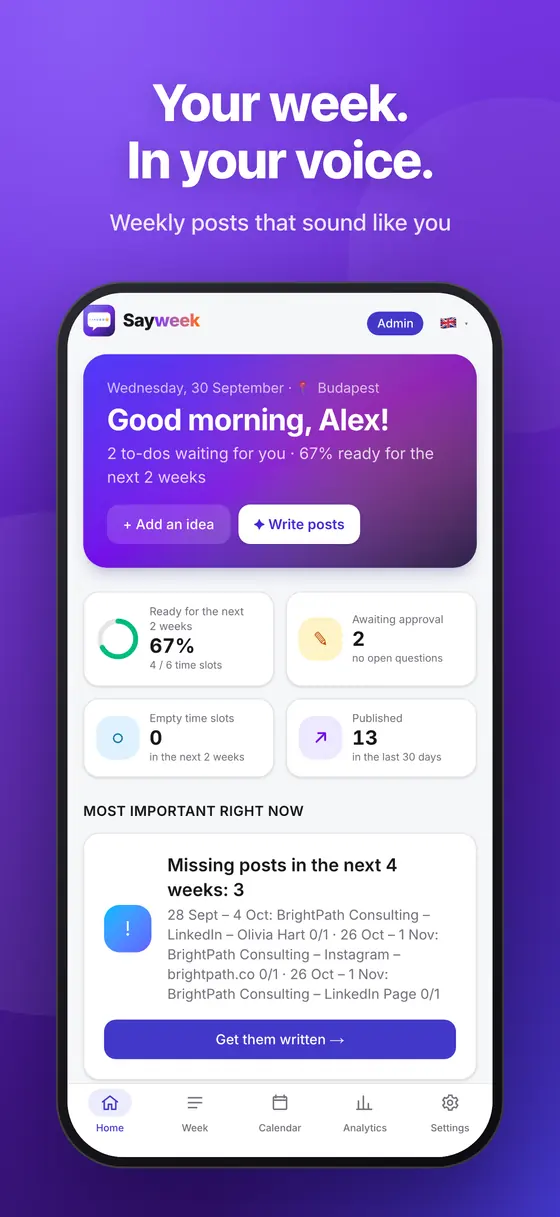
Client approval in the Sayweek appThe Sayweek app overview screen on a phoneIdeas in the Sayweek app

Use cases

For people with plenty to say – and no time to write it down

Solo, as a team or as an agency: Sayweek fits the way you work.

Consultants and coaches

LinkedIn is your main source of clients, but you don't have time to write three times a week.

  • Your workshops, calls and insights become posts
  • In your voice, not a generic “LinkedIn voice”
  • About 15 minutes of review a week
Recommended plan: Pro

Agencies and ghostwriters

Many clients, each in their own voice – with approvals and reports your clients understand.

  • Up to 15 brands, each with its own rules
  • Login-free client approval links
  • White-label app and monthly PDF reports
Recommended plan: Agency

Small and mid-sized businesses

Company page and colleagues' profiles together: your company's message in your people's own words.

  • LinkedIn page, Instagram and Facebook
  • Employee advocacy in each colleague's voice
  • Roles and two-step approval
Recommended plan: Team

Examples

A typical week – in four examples

A consultant, an agency, a B2B firm and a coach: fictional companies, Sayweek's real features.

All use cases
  • Illustrative example

    A consultant who posts from her meetings

    Calendar and meeting transcripts → LinkedIn posts in her own voice, with a weekly plan and approval.

    Recommended plan: ProSee the example
  • Illustrative example

    An agency with several client brands

    Client approval links, a monthly PDF report, cross-posting to Instagram and Facebook, a white-label app.

    Recommended plan: AgencySee the example
  • Illustrative example

    A B2B services firm using Team voice

    Company news → a draft for every colleague in their own voice, CRM ideas, the LinkedIn company page and personal profiles.

    Recommended plan: TeamSee the example
  • Illustrative example

    A coach who posts from voice notes

    A voice note to the Telegram bot → Instagram and LinkedIn posts with brand graphics, scheduled at good times.

    Recommended plan: SoloSee the example

Illustrative example – fictional company, real features

Comparison

How is it different from what you've tried?

Writing it yourself takes hours, a generic AI tool doesn't know you, and a scheduler doesn't write for you.

How is it different from what you've tried?
Doing it yourselfGeneric AI toolsSchedulersSayweek
Where topics come fromA blank page every weekWhatever you type into a promptYou bring themYour calendar, notes, voice memos, CRM and the news
Sounds like youYes – if you find the timeAn average “AI voice”Doesn't writeLearns from your posts and every edit
Your timeHours every weekPrompting, copying, fixingWriting is still up to youAbout 15 minutes of review a week
Approval and clientsE-mail ping-pongNoneVaries by toolBuilt in, with login-free client links
PublishingManually, one network at a timeCopy and pasteYesDirectly, at the best time
Comments and resultsScattered across appsNoneVaries by toolComment inbox, analytics, monthly PDF report
Agency workNoneNoneVaries by toolUp to 15 brands, white-label app and reports
A weekly chat for topicsUp to youIf you prompt it wellNoneA 5-minute weekly interview by voice or text
Posts by colleaguesChasing colleaguesA prompt per personVaries by toolA draft in each colleague's own voice
Graphics for each postBy hand, in a design toolGeneric imagesVaries by toolBrand templates filled from the post
AI labels and complianceManualVaries by toolVaries by toolAI labels, approval log, report

How Sayweek compares with Buffer, Hootsuite and Taplio

Connected to the tools you already use

All optional – Sayweek works fine without them.

  • Google Calendar
  • Outlook
  • iCloud
  • HubSpot
  • Pipedrive
  • Notion
  • Google Drive
  • Canva
  • Slack
  • Microsoft Teams
  • Zapier
  • Make
  • Google Analytics 4
  • Postiz
Works with Claude & ChatGPT

Tell Claude: “write next week's posts from my calendar”

Connect Sayweek to Claude or ChatGPT. The assistant sees your week plan and a summary of your calendar – and the drafts land in Sayweek, waiting for your approval.

  • One-click connector (claude.ai → Connectors)
  • Drafts only – nothing goes out without your approval
  • Revocable any time, every step logged
How to connect →

Security and privacy

Your data stays yours

European data storage, encryption and one simple rule: nothing is published without your approval.

  • Nothing without your approval

    Every post is scheduled only after you approve it – and there's an emergency brake.

  • EU data storage, GDPR

    An EU database and a data processing agreement (DPA) for every customer.

  • No AI training on your data

    Posts are written by Anthropic's Claude, which doesn't train on data sent through the API.

  • E-mails and clients protected

    E-mail bodies are never stored, only the anonymised idea; client and personal names are masked.

  • Encryption and secure sign-in

    Encrypted tokens (AES-256-GCM), two-factor sign-in, passkeys and an audit log.

  • Export or delete anytime

    Export everything, or delete your account whenever you want.

Privacy Policy Data Processing Agreement

Why we built it

It's not a lack of things to say. It's a lack of time.

Most professionals have plenty to say: every week they learn something from a client, a workshop or the news. By the time they'd write it down, the next week has started.

Generic AI tools made writing faster, but not personal. So Sayweek starts from what actually happened to you – and the final decision always stays with you.

The Sayweek team · MAD Consulting, Dubai

14 days

free trial, no card required

10

social networks from one place

3 languages

English, German and Hungarian posts and app

0

posts published without your approval

Pricing

Simple pricing, with a launch offer

Every plan starts with a 14-day free trial, no card required.

★ Launch offer: −60% for your first 12 months on monthly billing

  • Solo

    1 author, 3 channels.

    €11.60€29

    / month + VAT · for the first 12 months, then €29 / monthor €24.17 / month billed annually (2 months free)

    30 AI posts / month

  • Most popular

    Pro

    4 brands, 10 channels, client approval links, monthly report.

    €23.60€59

    / month + VAT · for the first 12 months, then €59 / monthor €49.17 / month billed annually (2 months free)

    80 AI posts / month

  • Team

    8 brands, 3 users, roles and Team voice.

    €51.60€129

    / month + VAT · for the first 12 months, then €129 / monthor €107.50 / month billed annually (2 months free)

    200 AI posts / month

  • Agency

    15 brands, white-label app and reports.

    €119.60€299

    / month + VAT · for the first 12 months, then €299 / monthor €249.17 / month billed annually (2 months free)

    500 AI posts / month

Every feature free for 14 days, no card required. Cancel any time.

Frequently asked questions

How does Sayweek write in my voice?

You paste a few of your old posts when you set up a brand. Sayweek learns from them, from every edit you make and from your best-performing posts, and turns this into style rules for your own workspace. Every post also starts from your own thought, story or experience – that's what keeps it from sounding generic.

Which social networks can I post to?

LinkedIn (profile and company page), Instagram (posts and stories), Facebook pages, Google Business Profile, Threads, Bluesky, Telegram and X. LinkedIn, Instagram, Facebook and Bluesky can be connected directly; direct YouTube and TikTok publishing is coming once the platforms have approved us. The other networks are published through Postiz, a scheduling service you connect with its API key in the settings.

Does Sayweek read my calendar and e-mails?

Only if you connect them, and only read-only. E-mail bodies are never stored – only the short, anonymised idea written from them. Client and person names are masked before anything reaches the AI, and contract, price, personal, health and legal topics are left out. Sayweek works fully without these connections.

How does the free trial work?

14 days with every feature, no card required. When the trial ends nothing is charged automatically: you pick a plan, or writing and scheduling simply pause while your data stays.

All questions →

Your next week already happened. Let's post it.

Connect your calendar, paste a few old posts – your next week is ready in 10 minutes.

No card required · Cancel anytime · EU data storage, GDPR